

How SPF, DKIM and DMARC stop email spoofing vs phishing
Email spoofing is a forgery technique that fakes a sender's identity; phishing is the broader scam that often uses spoofing to feel believable. One is a method, the other is the attack built on top of it. If a message pressures you about money, passwords, or urgent action, stop, do not click anything, and verify through a phone number or website you already trust, not one supplied in the email.
Key takeaways
- Most phishing campaigns rely on email spoofing to create a convincing illusion of legitimacy, often employing lookalike domains and display-name tricks.
- Attackers exploit the SMTP protocol's trust in sender information, using differences between envelope-from and message-from fields to forge emails successfully.
- Typical scams include spear phishing with personal details, business email compromise involving impersonation, and domain spoofing to deceive recipients.
- Detecting spoofing involves verifying sender addresses, inspecting email headers, hovering over links, and not reacting to urgent or unexpected requests.
- Implementing SPF, DKIM, and DMARC helps organizations prevent spoofing at scale, but they cannot stop lookalike domains or compromised accounts from being exploited.
Table of Contents
- Email spoofing vs phishing: the key definitions
- How does email spoofing actually work?
- What do real phishing and spoofing attacks look like?
- How can I tell if an email has been spoofed?
- How do I prevent email spoofing and phishing from reaching me?
- SPF, DKIM and DMARC: how organisations stop spoofing
- I clicked a phishing link. What do I do now?
- Are spoofing and phishing treated differently under the law?
- What actually happens after a successful attack?
- What new tricks are attackers using now?
- PC Scientist perspective: what a real recovery actually looks like
- Get your email properly protected
- Where to go for authoritative guidance
- Sources
- FAQ
Email spoofing vs phishing: the key definitions
Email spoofing forges the sender details on a message so it looks like it came from someone it did not. Phishing is the fraudulent, socially engineered attack designed to steal information or install malware, and it very often leans on spoofing to make the message believable, according to Proofpoint. Spoofing is the disguise; phishing is the con.
A few related terms come up constantly in this space, and mixing them up muddies your defence:
- Spear phishing: a phishing attempt personalised with real details about you or your workplace, making it far more convincing than a mass blast.
- Business email compromise (BEC): fraud where an attacker impersonates an executive or supplier, usually to redirect an invoice payment or wage transfer.
- Domain impersonation: registering or misusing a domain that looks almost identical to a real one, often paired with spoofing to reinforce the illusion.
The relationship matters more than the vocabulary. Spoofing can exist without phishing (someone forging a header purely to test a mail server, for instance), but almost every serious phishing campaign uses some form of spoofing to get past your first glance. Understanding what is email spoofing at the technical level is what lets you catch the phishing attempt riding on top of it.
How does email spoofing actually work?
Spoofing exploits a structural quirk of how email gets delivered. Simple Mail Transfer Protocol (SMTP), the standard that moves email between servers, was never built with strong identity checks. It largely trusts what a sending server tells it, which means the "From" name and address a recipient sees can be typed in by the sender with almost no verification.
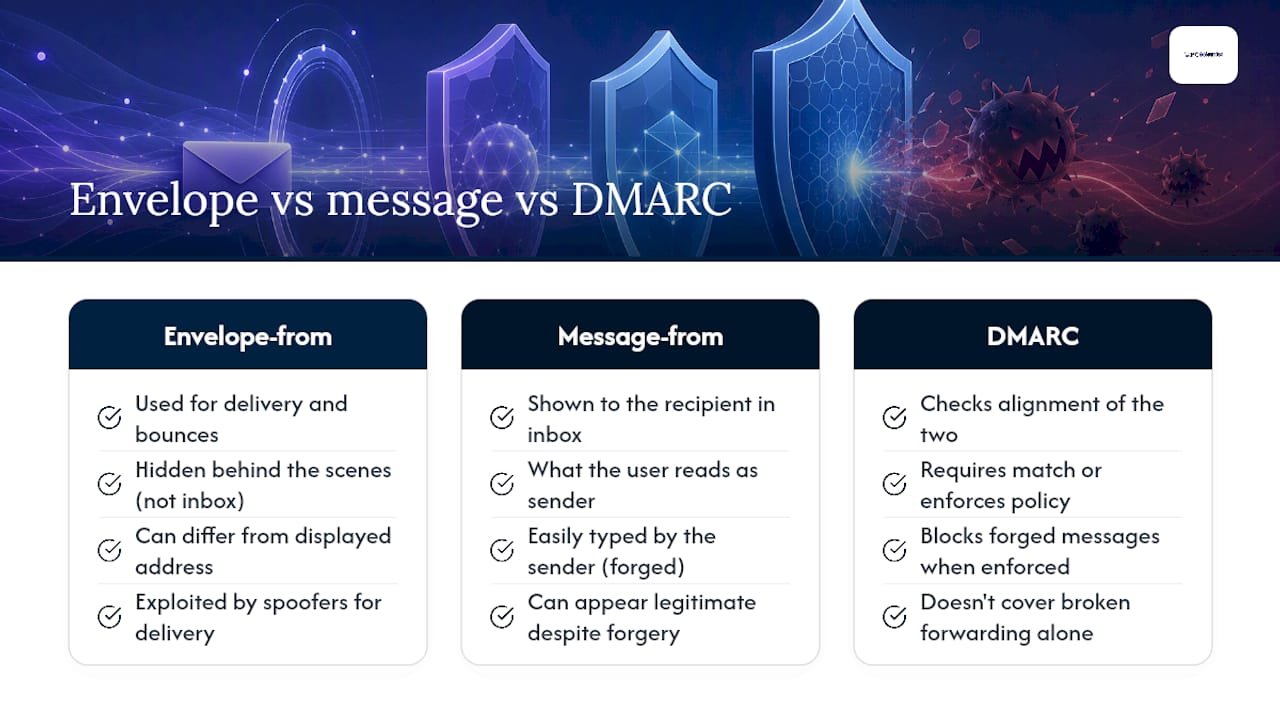
There are actually two "from" fields involved, and the gap between them is where a lot of spoofing hides. The envelope-from is the address used behind the scenes for delivery and bounce handling. The message-from is what appears in your inbox. Cyber.gov.au notes that attackers exploit the difference between these two, which is exactly why DMARC checks alignment between them rather than trusting either one alone. When they do not match up and no authentication is enforced, a forged message sails through looking legitimate.
Phishing then does the work of turning that forged trust into a payoff. It relies on a link to a fake login page built to harvest your username and password, an attachment carrying malware, or sometimes just a convincing request that gets you to reply with sensitive information directly. The visual polish, the urgency in the subject line, the "invoice attached" framing, all of that is phishing's job. Spoofing just gets it past your guard.
It is worth knowing where the clean technical story gets messy. Mailing lists and forwarding services can break authentication checks even for genuine senders, because the message passes through a third party before it reaches you. Authenticated Received Chain (ARC) exists to patch this by preserving authentication results across those handoffs, though it is still being adopted unevenly across mail providers. None of this changes your job as a reader, but it explains why "failed authentication" is not always proof of a scam, and why a passed check is not always proof of safety either.
What do real phishing and spoofing attacks look like?
Three patterns account for most of what lands in a typical inbox, and each has its own tell.
- Spear phishing with personal detail: an email referencing your actual employer, a recent purchase, or a colleague's name, built from information scraped off social media or a data breach, then wrapped around a fake invoice or password reset request.
- Business email compromise: an attacker impersonates a CEO, finance manager, or regular supplier, usually spoofing a lookalike domain, then asks for a bank transfer or a change to payment details on an existing invoice.
- Lookalike domains and display-name tricks: swapping a letter (
micros0ft.com), adding a hyphen, or simply setting the display name to "IT Support" while the underlying address is unrelated. Proofpoint's research confirms attackers deliberately use character substitution in domains specifically because most people never check the address behind the name.
A typical walkthrough looks like this: the attacker spoofs a supplier's domain, sends an "updated bank details" email to your accounts team, the email references a real, recent invoice number, and the request lands on a Friday afternoon when everyone wants it dealt with quickly. That combination of accurate detail and manufactured urgency is what makes BEC scams so costly for small businesses.
How can I tell if an email has been spoofed?
Run through these checks in order, before you do anything else with a suspicious message.
- Check the actual sender address, not just the display name. Tap or hover over it. A mismatch between the name shown and the address underneath is one of the clearest signs something is wrong.
- Look at the "Reply-To" field. Some spoofed emails display a legitimate name but quietly route replies to a completely different address.
- View the full email headers if your mail client allows it. This shows the actual sending server and can reveal a mismatch that a quick glance would miss.
- Hover over links before clicking, and check where they actually point. A shortened URL or a domain that is almost right but not quite is a strong warning sign.
- Watch for urgency, unexpected attachments, generic greetings, and money requests. Real organisations rarely demand instant action over email, and eSafety frames phishing as fundamentally a trust problem, where the fix is pausing to verify rather than reacting.
Pro Tip: Screenshot the email and copy the full headers before you delete anything. If you end up reporting the incident to your bank, your IT provider, or eSafety, that evidence makes the investigation faster and far more useful.
Once you have run the checks, verify through a channel you already trust, a phone number from a previous invoice, the number on the back of your bank card, not anything supplied in the email itself.
How do I prevent email spoofing and phishing from reaching me?
Individual protection comes down to habits more than software, though the software still matters.
- Turn on multi-factor authentication (MFA) everywhere it is offered. Even if a phishing attempt steals your password, MFA stops the attacker from getting into the account.
- Use unique, strong passwords per account, ideally through a password manager, so one leaked password does not unlock everything else you own.
- Keep your operating system, browser, and email client updated, and run reputable anti-malware software. A lot of phishing payloads exploit vulnerabilities that a patch would have closed months earlier.
- Build a verification habit: if a request involves money or account access, call the organisation using a number you already have on file, never one from the email.
- Never reply directly to a suspicious message, even to say "is this real?" Replying confirms your address is active and monitored.
- Report it. Forward suspicious emails to the organisation being impersonated, report scams through eSafety, and contact your bank immediately if financial details were involved.
None of this needs to be complicated. The people who get caught out are rarely careless; they are just moving fast on a Friday afternoon, which is exactly when attackers send these emails.
SPF, DKIM and DMARC: how organisations stop spoofing
Individuals can spot suspicious emails one at a time. Organisations need something that works at scale, and that is what SPF, DKIM, and DMARC are for.
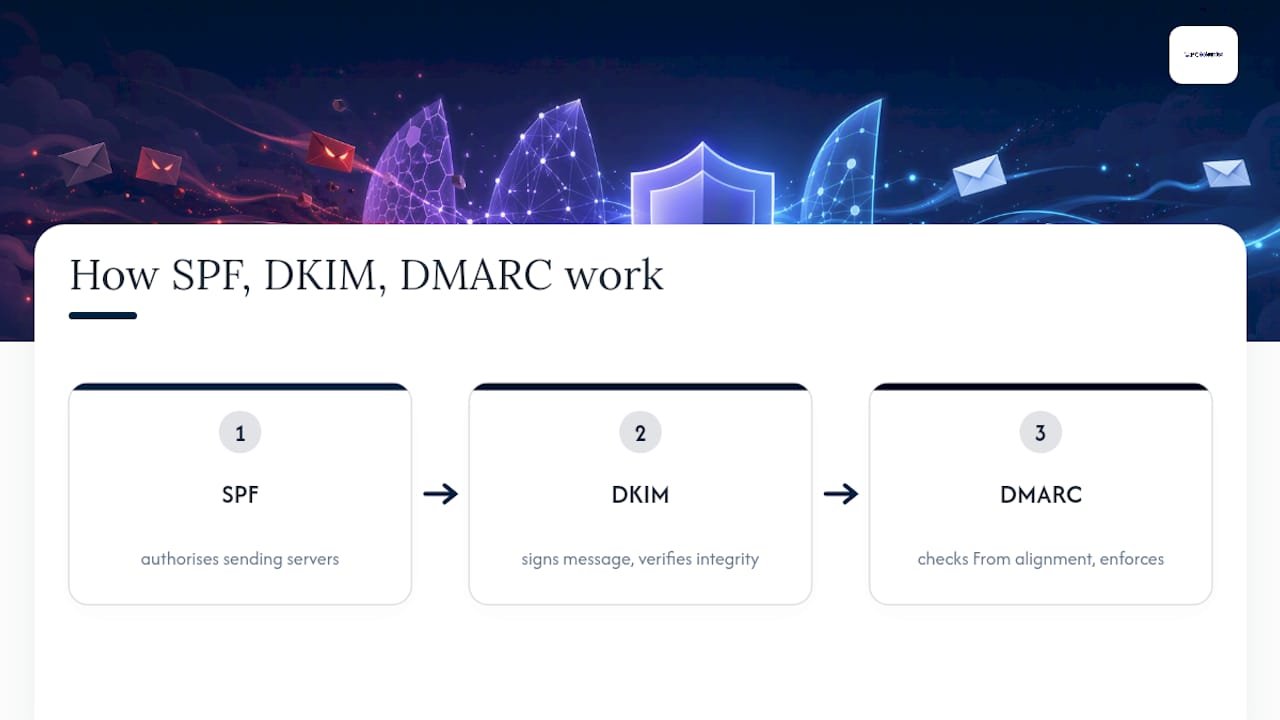
SPF (Sender Policy Framework) lists which mail servers are allowed to send on behalf of a domain. DKIM (DomainKeys Identified Mail) attaches a cryptographic signature to outgoing messages, so the receiving server can confirm the content was not altered in transit. DMARC (Domain-based Message Authentication, Reporting and Conformance) ties the two together by checking alignment between the visible "From" address and the domains SPF and DKIM actually verified. Together, SPF, DKIM and DMARC form a toolbox that closes most of the gap SMTP leaves open.
Rolling DMARC out badly can break your own legitimate mail, so Cyber.gov.au recommends a staged approach: start at p=none to monitor traffic and see what is actually sending mail as your domain, move to p=quarantine once you trust the reports, then finish at p=reject once you are confident. DMARC reports are the part most businesses skip, and skipping them is a mistake, because they show you exactly who is sending unauthorised mail using your domain before you enforce anything.
None of these three standards catch a lookalike domain, because that is a different domain entirely, technically legitimate on its own terms, just deceptive. They also cannot stop an attacker who has already compromised a genuine account. That is where ARC (Authenticated Received Chain) helps preserve authentication results through forwarding and mailing lists, and where inbound filtering and staff training have to pick up the slack that pure authentication cannot cover.
I clicked a phishing link. What do I do now?
Move fast, but move in the right order.
- Stop interacting immediately. Close the tab, do not enter anything further, and do not "undo" by clicking something else on the page.
- Change your passwords from a different, trusted device, starting with email and banking, and turn on MFA if you have not already.
- Scan the device for malware. If you suspect infection, disconnect it from your network to stop anything spreading further.
- Contact your bank or any service where financial details were exposed, and report the incident to them directly.
- Get professional help if you are unsure what was compromised. A managed cleanup beats guesswork, especially on a shared or business device.
- Preserve the original email and any screenshots before you report it, for your bank, eSafety, or your IT provider.
Reading a phishing email rarely causes harm on its own; the damage almost always comes from what happens after you click, according to HowStuffWorks' breakdown of phishing mechanics. That is genuinely reassuring news if you have just opened one and are starting to panic.
Are spoofing and phishing treated differently under the law?
Spoofing and phishing sit in different legal categories, even though they usually turn up in the same incident. Spoofing itself, forging a sender address, is generally treated as a technical offence tied to fraud or unauthorised access legislation, because the act of forging headers is rarely illegal in isolation; it becomes actionable once it is used to deceive or steal.
Phishing, by contrast, sits squarely within fraud and cybercrime law because it involves the actual attempt to obtain money, credentials, or data by deception. In Australia, this generally falls under the Criminal Code Act 1995 provisions on fraud and unauthorised computer access, alongside state-based fraud offences, depending on how the case unfolds.
Regulators also treat the two differently in practice. Domain-level spoofing protections like DMARC enforcement are increasingly expected as part of an organisation's basic cyber hygiene, and failing to implement them can matter in a regulatory review after a breach, particularly for businesses handling financial or health information. Phishing incidents, on the other hand, trigger obligations under privacy and notifiable data breach schemes when personal information is exposed, regardless of whether spoofing was involved in the delivery.
For everyday readers, the practical distinction rarely matters. What matters is that both are reportable. eSafety exists specifically to give individuals a path to report scams and fake emails, and businesses have separate obligations to report data breaches to the Office of the Australian Information Commissioner when customer data is involved.
What actually happens after a successful attack?
The consequences scale with what the attacker actually got, not just what they attempted. A phishing email that gets deleted unread costs nothing. One that gets a password costs an account. One that gets a wire transfer redirected through a BEC scam can cost a business ten of thousands of dollars in a single afternoon, and that money is rarely recoverable once it clears.
For individuals, the immediate financial hit is often smaller than the follow-on damage. A compromised email account gets used to reset other passwords, contact your actual banking or superannuation providers, or spam your entire contact list with the same scam, extending the damage to people who trusted a message because it came from you. Identity theft built from a single successful phishing attempt can take months to fully untangle.
For businesses, the cost is rarely just the direct loss. There is the time spent investigating what was actually accessed, the reputational hit if clients were emailed from a compromised account, and in some cases mandatory breach reporting obligations that come with their own administrative burden. A single successful spoofing-enabled BEC scam has ended long-standing supplier relationships simply because trust in the email channel itself broke down.
The quiet cost that rarely gets discussed is momentum. A business dealing with an active compromise stops doing normal work while it contains the damage. That downtime, more than the direct financial loss in many cases, is what actually hurts.
What new tricks are attackers using now?
Attackers keep refining the same core trick, forged trust, but the execution keeps getting harder to spot. Generative AI has improved phishing email quality, removing broken grammar and awkward phrasing, making them harder to distinguish from genuine emails, matching writing style with unsettling accuracy.
Voice and video deepfakes are emerging as a layer on top of email-based BEC scams, with spoofed emails followed by phone calls using cloned voices to add pressure and legitimacy. QR code phishing, sometimes called "quishing", has grown because QR codes hide their destination URL, bypassing the common "hover over the link" user check that has protected people for years.
Attackers are also getting smarter about timing. Rather than blasting generic messages, they are watching for real events, a genuine invoice, a real system outage, a known supplier relationship, and inserting a spoofed message at exactly the moment it would seem most plausible. The technical defences discussed earlier still work against most of this, but they work best combined with a healthy dose of scepticism about anything that asks you to act fast.
us perspective: what a real recovery actually looks like
When a client calls us after a suspected compromise, the order of operations matters more than speed. We contain first, isolating the affected account or device, then remove whatever got in, then restore access safely, and only then harden mail flow so it does not happen again. Skipping straight to "fix it" without containing the threat first is how a bad afternoon turns into a bad month.
Most of the work after an incident is unglamorous: mailbox hardening, forced password resets, a proper SPF, DKIM and DMARC review, and malware removal where a device was touched. If you suspect any account has been compromised, get a professional look at it before assuming it is fine, because the visible damage is rarely the whole story.
- PC Scientist
Get your email properly protected
There are practical alternatives to leaving your email security to guesswork. Where most homes and small businesses only find out their SPF and DMARC records are missing or misconfigured after an incident, we check that before it becomes a problem.
Our team handles business email and Microsoft 365 support alongside broader cybersecurity assessments and incident response when something has already gone wrong. If you have just clicked something you shouldn't have, or you simply want your domain's authentication properly set up before it becomes a problem, book an IT support assessment and we will walk through exactly what needs fixing, in plain language, with a clear next step at the end of the call.
Where to go for authoritative guidance
For technical implementation detail on email authentication, Cyber.gov.au's guide to combating fake emails covers SPF, DKIM, and DMARC deployment for Australian organisations. Individuals wanting practical, plain-language tips should read eSafety's guide to spotting a fake email. For a deeper technical breakdown of spoofing mechanics, Cloudflare's explainer is a solid reference for implementers.
Sources
- Cyber
- How to spot a fake email | Be Connected (eSafety)
- What Is Email Spoofing? How It Works & More | Proofpoint AU
- What is email spoofing? | Cloudflare
Recommended
- Phishing email examples: spot the fake before you click
- Business Cybersecurity NSW | After a Scare
- Cybersecurity Scientist | Safer Devices NSW
Frequently Asked Questions
Straight answers about How SPF, DKIM and DMARC stop email spoofing vs phishing - without jargon or pressure. Call 0493 563 381 for advice, or get help below.
Want the quickest answer? 0493 563 381 for free advice.
Email spoofing is the forging of a message's sender details, the display name, the address, or both, so it appears to come from someone other than the actual sender.
Common categories include email spoofing (forged sender headers), domain or lookalike-domain spoofing, display-name spoofing, and caller ID or phone spoofing, though definitions vary slightly across sources.
Check the actual sender address behind the display name, inspect the Reply-To field, view full headers if possible, and hover over any links before clicking to see where they actually lead.
Simply opening or reading it is usually harmless. The risk comes from clicking a link, opening an attachment, or entering credentials on a page it links to.
They are not directly comparable because spoofing is a technique and phishing is the attack, but phishing causes the actual harm, theft, malware, financial loss, while spoofing is usually the disguise that makes it convincing.
Cybersecurity across NSW
Want help telling spoofing from phishing?
If the device still does not feel safe, that is okay. Get help in your area and we will take it from here.
Start here
Get cybersecurity help
Optional Need a Sydney city or region?
Choose a side of Sydney
These are Sydney cities and regions, such as the Northern Beaches or Inner West. First tap a side of Sydney. Then open the city or region that covers you.
C Sydney City / Inner 3 areas
N Northern Sydney 6 areas
NW North-West / Central Sydney 3 areas
W Western Sydney 1 area
SW South-West Sydney 3 areas
S Southern Sydney 2 areas
Optional Find your suburb
Type a suburb from our listed coverage. This opens the matching city or region page for this topic. Listed suburb pages are general technology services, not this specialist page.
If your suburb is not listed, use the city or region list above, or call 0493 563 381.
Disclaimer
The information in this article is provided for general educational and informational purposes only. While PC Scientist strives to keep all content accurate and up to date, technology issues can vary depending on your device, software, network configuration, and individual circumstances. Always back up important data before attempting repairs or system changes. If you are unsure or the issue cannot be resolved safely, contact PC Scientist today for professional onsite or remote IT support. PC Scientist is not liable for any loss of data, damage, or other issues resulting from the use of the information provided in this article.
